大明科研司 DEEPSEEK HARNESS · DSH BUNDLE

内阁模式
Cabinet Mode

A declarative DSH bundle that adds Cabinet Mode to DeepSeek Harness: a grand-secretary Lead directs members of four bureaus of the Great Ming Research Bureau. Research first, change code only when authorized, and every conclusion must cite a source.

v0.5.4 MIT License preset id: cabinet targets DSH 0.2.2-rc.1
https://raw.githubusercontent.com/luodaoyi/dsh-cabinet-mode/market-index/marketplace.json
文渊阁 · 首辅
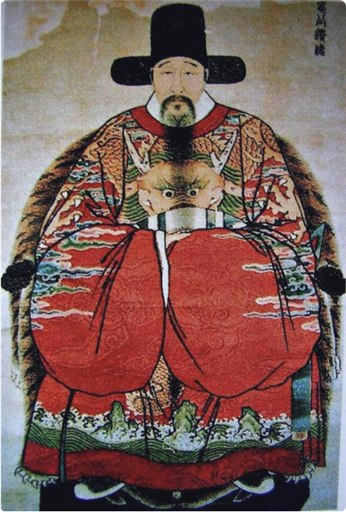
Grand-secretary portrait shipped with the bundle
「臣谨领圣谕。」 「臣谨遵圣谕,夙夜匪懈。」 「容臣会同九卿,议定而后行。」 「容臣票拟以闻。」

At a glance

What Cabinet Mode is, plus the current version, platforms and install path.

Cabinet Mode is an open-source DSH bundle for DeepSeek Harness with preset id cabinet. It organizes a session into a multi-agent research team led by a grand secretary and four bureau members; research comes first, and conclusions must cite a path, line or command output.

Cabinet Mode key facts
ItemValue
ProductCabinet Mode (内阁模式)
TypeDSH bundle / multi-agent preset for DeepSeek Harness
Preset idcabinet
Versionv0.5.4
License and priceMIT License, free and open source
Earlier package tests0.2.1-rc.3 / rc.5
PlatformsLinux/macOS (tool-bash), Windows (tool-pwsh)
InstallDSH plugin market raw index; release tarball fallback

Features

The README is the source of truth; tested scope is documented under "Unverified items" in the repository.

Dual-identity persona

The Lead reads the request, splits it, assigns work, adjudicates, summarizes and closes the loop. Members of the four bureaus — Hanlin editor, Minister of Works, Dali chief minister, Left Censor-in-Chief — execute bureau-scoped work and must never claim to be the Lead.

Research first

Defaults to research before touching code; changes need explicit authorization. Every conclusion must cite a path, line or command output; unverified items are marked as such and sources are never fabricated.

Right-sidebar Cabinet panel

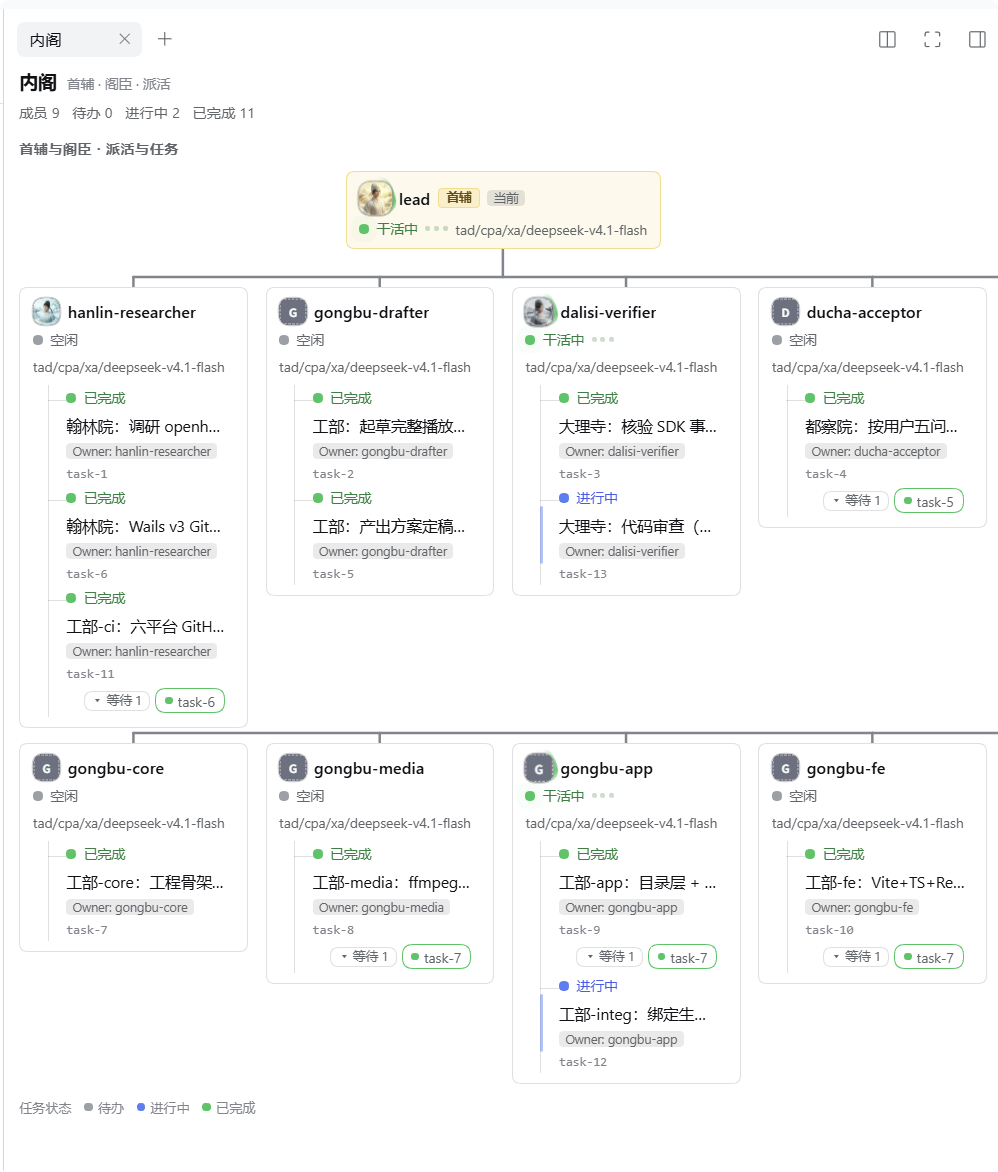
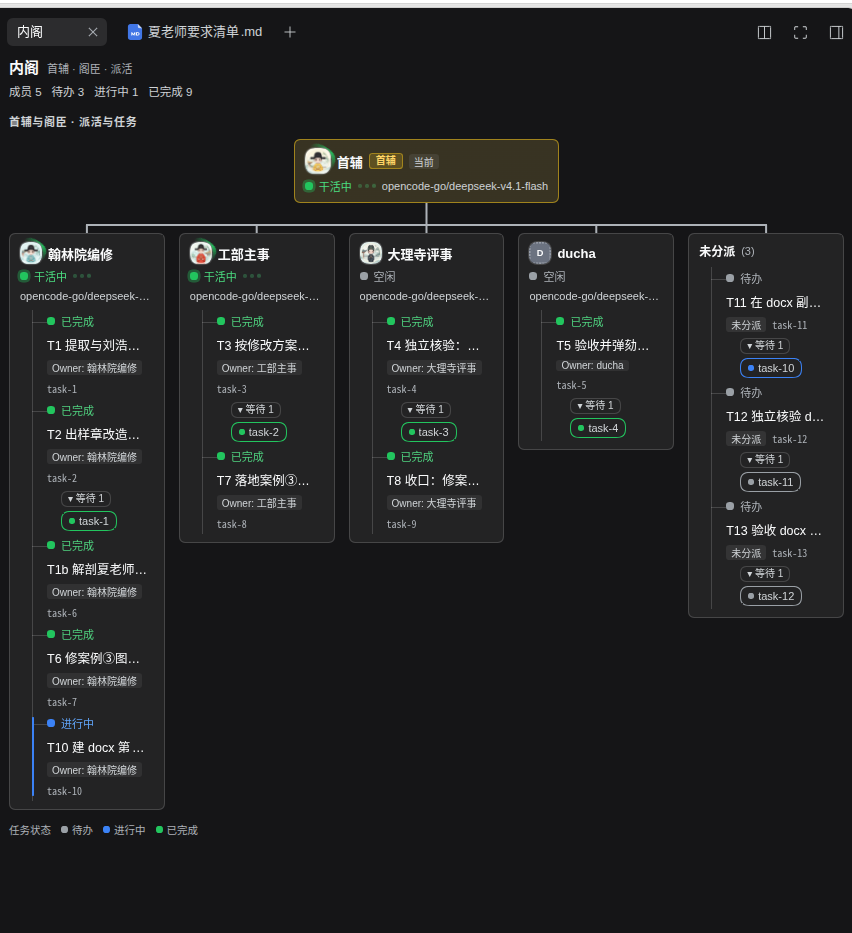
A dispatch tree files every task under its owner, with dependencies as chips. Running members pulse green; idle / starting / failed use gray / amber / red dots; tasks are colored pending, in progress and completed.

Customizable members

All five offices accept a display name (40 chars), portrait and duty prompt (4000 chars); each office can pick its own model from the official session.modelCatalog. Saves are atomic; a stale draft cannot overwrite newer values.

Standard-Mode parity

Reuses the same 22 plugin rows as the tested DSH Standard Mode — tool coverage depends on host/package versions. The declaration has no hard version gate: no engines.dsh, no peer dependency, earlier packages tested on 0.2.1-rc.3 and rc.5.

Cross-platform by design

tool-bash on Linux/macOS, tool-pwsh on Windows, exactly like Standard Mode. Distributed as an npm package with a market index — no build step, no CDN.

Cabinet Mode vs Standard Mode

Cabinet Mode compared with DSH Standard Mode
DimensionStandard ModeCabinet Mode
Plugin rows2222, tool coverage unchanged
PersonaSingleLead + four bureau members, dual identity
Dispatch panelNoneRight-sidebar Cabinet dispatch tree
Member customizationNoneDisplay name, portrait, duty prompt, per-office model
Version gate—No hard gate; earlier packages tested on 0.2.1-rc.3 / rc.5

The cabinet

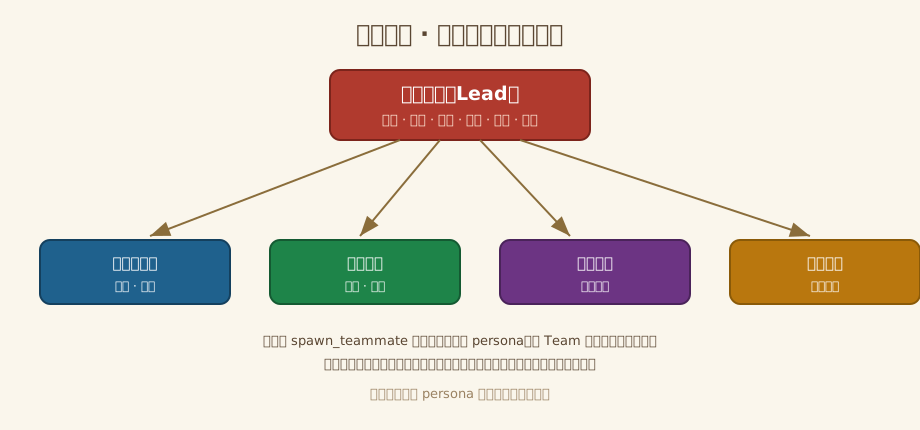
The Lead sits on top; the four bureaus execute. Members are spawned via spawn_teammate and inherit the same persona.

Cabinet layout diagram: the Lead directing the Hanlin editor, Minister of Works, Dali chief minister and Left Censor-in-Chief
Lead avatar
内阁首辅 · Leadcrane badge, first rank (artistic)
Hanlin editor avatar
翰林院编修 · Hanlin editorduck badge, seventh rank
Minister of Works avatar
工部尚书 · Minister of Worksgolden pheasant, second rank
Dali chief minister avatar
大理寺卿 · Dali chief ministerpeacock badge, third rank
Left Censor-in-Chief avatar
左都御史 · Left Censor-in-Chiefxiezhi badge, censorate

Screenshots

Captures of the Cabinet panel in real sessions, provided by the project owner. Click to enlarge.

Cabinet panel in light theme: dispatch tree, running and idle members, task progress and dependencies
Light theme: dispatch tree, running members, task progress and dependencies
Cabinet panel in dark theme: task columns, unassigned group and dependency chips
Dark theme: task columns, unassigned group and dependency chips

Install

The DSH plugin market is the recommended path: it installs the npm bundle into your profile — no checkout, no hand-edited patch.

  1. Enable the custom plugin market

    Open Plugins → Experimental plugins → More, then enable Custom plugin market (自定义插件市场).

  2. Add the index source

    Back at Plugins → Discover → Index sources, paste the raw JSON URL above and click Add.

    Use the raw URL. GitHub blob / tree webpage URLs are not an index — DSH fails with $.format must be 1.
  3. Install and enable

    Wait for Cabinet Mode / 内阁模式, click Install, and confirm the package is dsh-cabinet-mode@<version> from https://registry.npmjs.org/. Then click Enable now, or turn the plugin switch on under Installed.

  4. Restart and pick the mode

    Fully quit and restart DSH — the preset and client plugin are only assembled at startup. Start a new session and pick 内阁模式 in the mode picker; open the Cabinet tab via + in the right sidebar if needed.

Install with an AI agent (copy this prompt)
Install the Cabinet Mode (内阁模式) DSH bundle for me, preferably through its plugin market index:
https://raw.githubusercontent.com/luodaoyi/dsh-cabinet-mode/market-index/marketplace.json

1. Identify my DSH version and intended profile. Use the existing UI to enable Custom plugin market, then Plugins → Discover → Index sources.
2. Add the exact raw JSON URL above. Do not use GitHub blob/tree URLs, edit the index, or invent a command to add a market source.
3. Install Cabinet Mode from that source. Verify the confirmation shows dsh-cabinet-mode@<version> from https://registry.npmjs.org/, then verify the Installed result and version. Click Enable now or turn on the plugin switch on Installed, and verify it is enabled.
4. If browser/UI control is unavailable, give me those short UI steps. Use the release tarball or local-directory fallback only when the market is unavailable or I choose it; explain the specific reason first.
5. Do not also append cordis.patch.yml to my profile: installing both ways duplicates the preset. Preserve my existing profile and plugins.
6. Tell me to fully quit and restart DSH, create a new session and choose 内阁模式 (preset id cabinet). Do not claim success until the installed version is verified; do not claim untested team behavior works.

On failure, show the exact error. For $.format must be 1, replace the webpage source with the raw JSON URL. Do not repeatedly reinstall or silently switch methods.

Fallback: release tarball

Only when the market is unavailable, or for local development. Fully quit desktop DSH first to release the profile lock.

dsh plugin --profile desktop add https://github.com/luodaoyi/dsh-cabinet-mode/releases/download/v0.5.4/dsh-cabinet-mode-0.5.4.tgz
dsh plugin --profile desktop list

Method A (bundle install) and Method B (node scripts writing cordis.patch.yml) are mutually exclusive; installing both duplicates the preset id and the declaration fails to load.

Good to know

  • Fully quit and restart DSH after installing or updating; a session's mode is locked once it has produced output, so pick Cabinet Mode in a new session.
  • The nine team tools (spawn_teammate, team_task_*, …) come from the @deepseek-ai/dsh-experimental-agent-team-profile bundle; without it the cabinet runs without teammate tools.
  • A preset is trusted configuration and can execute host code; only install bundles from sources you trust.
  • Member settings live in the DSH_HOME/profile configuration (the cabinet-ui namespace) and are shared by browsers connected to the same profile.
  • Earlier package market installs were verified on the Windows rc.5 web client; Linux/macOS and other DSH versions are untested — see the installation matrix and "Unverified items" in the README.

Verification scope

Cabinet Mode verification scope
ScopeStatusNotes
DSH 0.2.1-rc.3 / rc.5Earlier packages verifiedStructure, plugin list and local test suite
Windows rc.5 web market installEarlier packages verifiedPlugin market install flow
Linux/macOS market installNot verifiedSee the README installation matrix
Other DSH versionsNot verifiedNo hard version gate; behavior not guaranteed
Team behaviorPartially unverifiedSee "Unverified items" in the README

Frequently asked questions

Quick answers about scope, installation and verification. The README is the source of truth for details.

What is Cabinet Mode?

Cabinet Mode is an open-source DSH bundle for DeepSeek Harness with preset id cabinet. A grand-secretary Lead reads the request, splits and assigns work, adjudicates and summarizes; members of four bureaus execute the scoped work.

How is it different from Standard Mode?

It reuses the same 22 plugin rows as Standard Mode, so tool coverage does not shrink. It adds a dual-identity persona, four bureau members, a right-sidebar dispatch panel and member customization. There is no hard DSH version gate.

How do I install it?

Add the raw marketplace.json under Plugins → Discover → Index sources, install and enable dsh-cabinet-mode, then fully quit and restart DSH. Start a new session and choose Cabinet Mode. Use the release tarball only as a fallback.

What does research first mean?

The default is research before code changes, and code changes require explicit authorization. Every conclusion must cite a file path, line or command output; unverified items are marked as such and sources are never fabricated.

Is it free, and which platforms are supported?

It is free and open source under the MIT License. Linux and macOS use tool-bash; Windows uses tool-pwsh. Earlier package market install was verified on the Windows rc.5 web client; see the installation matrix for other versions.

Does this site collect analytics?

No. This is a static introduction page with no third-party analytics or advertising scripts. The plugin runs in your local DSH profile, and member settings live in the cabinet-ui namespace under DSH_HOME/profile.

Changelog

Recent improvements, newest first.

  1. v0.5.4

    Correct task dependency flow and open teammate sessions from task titles and member cards; retain per-office model selection fixes.

    Release notes v0.5.4 →

The current release targets DSH 0.2.2-rc.1. On rc.3/rc.5, keep the verified 0.5.0 package. Older overrides have no ownership records: select the desired native model once before enabling the new policy.

Full changelog →