
内阁模式是什么?
内阁模式(Cabinet Mode)是 DeepSeek Harness 的开源 DSH 插件,preset id 为 cabinet。首辅负责审题、拆解、派工、裁断和汇总,翰林、工部、大理寺、都察院四司阁臣分司执行。
大明科研司 DEEPSEEK HARNESS · DSH BUNDLE
一个声明式 DSH bundle,为 DeepSeek Harness 加上「内阁模式」:内阁首辅主政, 翰林、工部、大理寺、都察院四司阁臣分司办事。研究优先,结论必带出处。
https://raw.githubusercontent.com/luodaoyi/dsh-cabinet-mode/market-index/marketplace.json
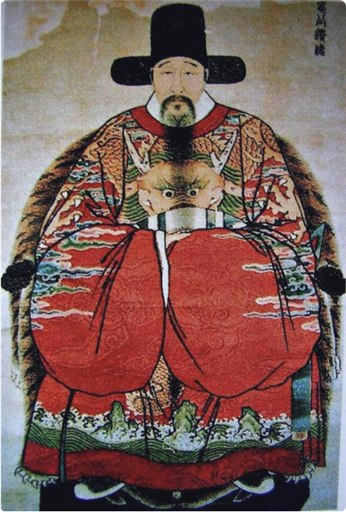
先看结论:内阁模式是什么,以及当前版本、平台与安装方式。
内阁模式(Cabinet Mode)是 DeepSeek Harness 的开源 DSH 插件,preset id 为 cabinet。它把会话组织成由首辅与四司阁臣组成的多智能体研究团队,默认先研究后改码,并要求结论引用路径、行号或命令输出。
| 项目 | 值 |
|---|---|
| 产品 | 内阁模式(Cabinet Mode) |
| 类型 | DeepSeek Harness DSH bundle / 多智能体 preset |
| preset id | cabinet |
| 版本 | v0.5.4 |
| 许可与价格 | MIT License,免费开源 |
| 旧包实测 DSH | 0.2.1-rc.3 / rc.5 |
| 平台 | Linux/macOS(tool-bash)、Windows(tool-pwsh) |
| 安装 | DSH 插件市场 raw 索引;Release tarball 回退 |
以下能力以 README 为准;各能力的实测范围见仓库「Unverified items」一节。
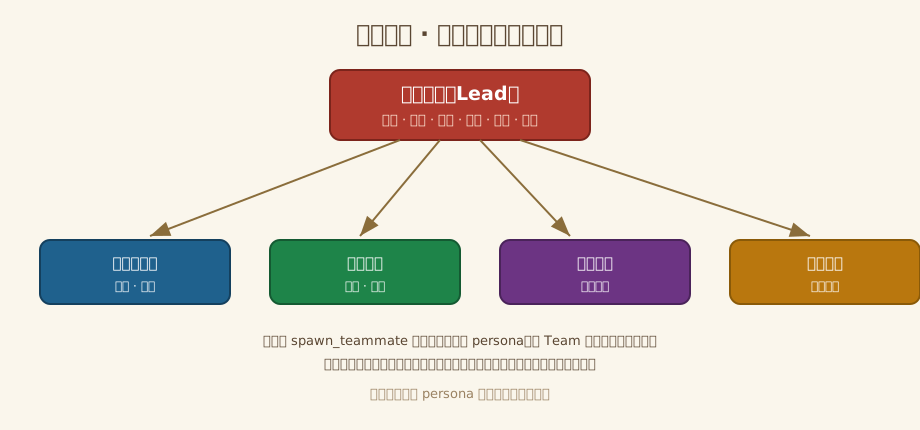
首辅审题、拆解、分派、裁断、汇总、闭环;翰林院编修、工部尚书、大理寺卿、左都御史按司执行。同一 persona 依 Team 身份短语自认角色,阁臣禁止冒充首辅。
默认先调研、后动码,改代码需明确授权。每个结论必须锚定路径、行号或命令输出;未验证事项如实标注,禁止编造来源。
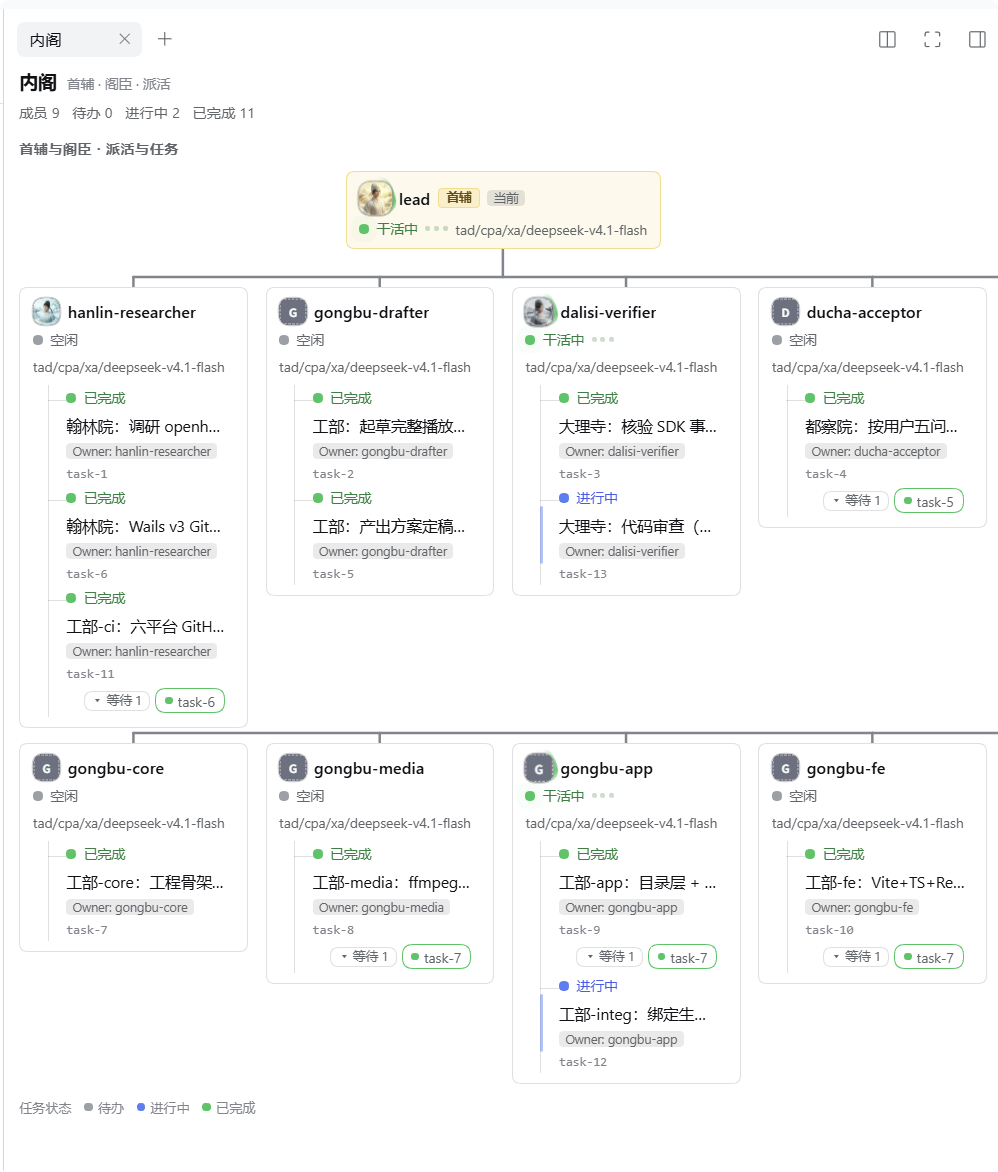
派工树按 ownerName 归位任务,依赖以 chips 呈现;运行成员绿点脉冲,空闲/启动/失败灰/琥珀/红点分级,任务状态 pending/进行/完成三色着色。
五个职位可改显示名(40 字)、头像与职责 prompt(4000 字);每司可从官方 session.modelCatalog 单独选模型。保存原子写入,过期草稿无法覆盖新值。
复用 DSH 标准模式 22 行插件清单,工具覆盖取决于宿主与包版本;声明无硬 DSH 版本门禁,不加 engines.dsh 与 peerDependencies,旧包实测 0.2.1-rc.3 与 rc.5。
Linux/macOS 启用 tool-bash,Windows 启用 tool-pwsh,与标准模式一致;npm 包 + 市场索引分发,即插即用,无构建步骤。
| 维度 | 标准模式 | 内阁模式 |
|---|---|---|
| 插件清单 | 22 行 | 22 行,工具覆盖取决于宿主与包版本 |
| persona | 单一 | 首辅 + 四司阁臣双身份 |
| 派工面板 | 无 | 右栏 Cabinet 派工树 |
| 成员定制 | 无 | 显示名、头像、职责 prompt、每司模型 |
| 版本门禁 | — | 无硬门禁;旧包实测 0.2.1-rc.3 / rc.5 |
首辅坐镇居上,四司阁臣各领其职;成员由 spawn_teammate 创建并继承同一 persona。





右栏 Cabinet 面板在真实会话中的截图,由项目维护者提供;点击可放大。
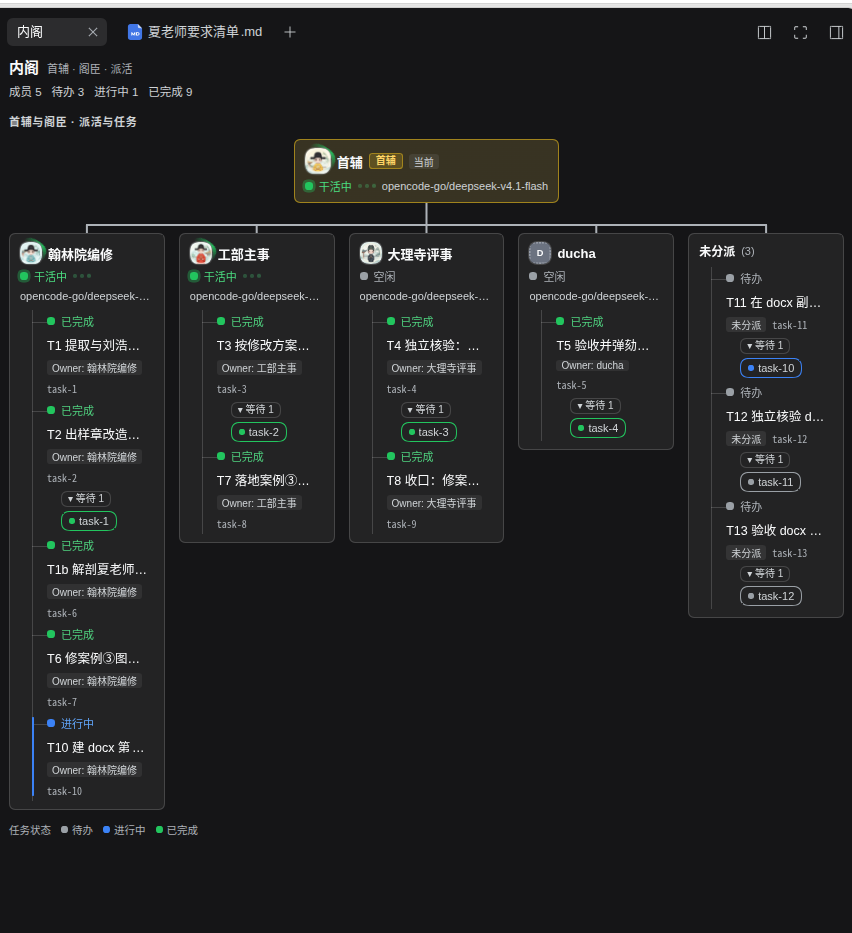
推荐走 DSH 插件市场:索引安装 npm 包到当前 profile,无需检出仓库或手改 patch。
打开 Plugins → Experimental plugins → More,启用「自定义插件市场」。
回到 Plugins → Discover(发现)→ 索引源,粘贴上面的 raw JSON URL,点「添加」。
$.format must be 1。等「Cabinet Mode / 内阁模式」出现,点「安装」,确认包为 dsh-cabinet-mode@<version>、registry 为 https://registry.npmjs.org/。装完点「立即启用」或在「已安装」页打开开关。
完全退出并重启 DSH(preset 与客户端插件只在启动时装配),新建会话,在模式选择器中选「内阁模式」;需要面板时在右栏「+」里打开 Cabinet 标签。
Install the Cabinet Mode (内阁模式) DSH bundle for me, preferably through its plugin market index:
https://raw.githubusercontent.com/luodaoyi/dsh-cabinet-mode/market-index/marketplace.json

1. Identify my DSH version and intended profile. Use the existing UI to enable Custom plugin market, then Plugins → Discover → Index sources.
2. Add the exact raw JSON URL above. Do not use GitHub blob/tree URLs, edit the index, or invent a command to add a market source.
3. Install Cabinet Mode from that source. Verify the confirmation shows dsh-cabinet-mode@<version> from https://registry.npmjs.org/, then verify the Installed result and version. Click Enable now or turn on the plugin switch on Installed, and verify it is enabled.
4. If browser/UI control is unavailable, give me those short UI steps. Use the release tarball or local-directory fallback only when the market is unavailable or I choose it; explain the specific reason first.
5. Do not also append cordis.patch.yml to my profile: installing both ways duplicates the preset. Preserve my existing profile and plugins.
6. Tell me to fully quit and restart DSH, create a new session and choose 内阁模式 (preset id cabinet). Do not claim success until the installed version is verified; do not claim untested team behavior works.

On failure, show the exact error. For $.format must be 1, replace the webpage source with the raw JSON URL. Do not repeatedly reinstall or silently switch methods.
仅当市场不可用或本地开发时使用;先完全退出桌面 DSH 以释放 profile 锁。
dsh plugin --profile desktop add https://github.com/luodaoyi/dsh-cabinet-mode/releases/download/v0.5.4/dsh-cabinet-mode-0.5.4.tgz
dsh plugin --profile desktop list
方法 A(bundle 安装)与方法 B(node 脚本写 cordis.patch.yml)互斥,同装会使 preset id 重复、声明加载失败。
@deepseek-ai/dsh-experimental-agent-team-profile profile bundle;未启用时内阁按单人规则运行。DSH_HOME/profile 配置(cabinet-ui 命名空间),同 profile 的多个浏览器共享。| 范围 | 状态 | 说明 |
|---|---|---|
| DSH 0.2.1-rc.3 / rc.5 | 历史旧包已验证 | 结构、插件清单与本地测试套件 |
| Windows rc.5 web 市场安装 | 历史旧包已验证 | 插件市场安装流程 |
| Linux/macOS 市场安装 | 未验证 | 见 README 安装矩阵 |
| 其他 DSH 版本 | 未验证 | 无硬版本门禁,不保证行为 |
| 团队行为 | 部分未验证 | 见 README「Unverified items」 |
关于能力边界、安装与验证范围的快速回答;更完整的说明以 README 为准。
内阁模式(Cabinet Mode)是 DeepSeek Harness 的开源 DSH 插件,preset id 为 cabinet。首辅负责审题、拆解、派工、裁断和汇总,翰林、工部、大理寺、都察院四司阁臣分司执行。
它复用标准模式的 22 行插件清单,工具能力不缩水;额外提供双身份 persona、四司阁臣、右栏派工面板和成员定制。声明中没有硬性 DSH 版本门禁。
在 DSH 的 Plugins → Discover → Index sources 添加 raw marketplace.json,安装并启用 dsh-cabinet-mode;完全退出并重启 DSH,新建会话后选择「内阁模式」。市场不可用时可用 Release tarball 回退。
默认先调研、后改代码,修改代码需要你的明确授权。每个结论必须锚定文件路径、行号或命令输出;未验证事项会如实标注,不编造来源。
免费开源,MIT License。Linux/macOS 使用 tool-bash,Windows 使用 tool-pwsh。旧包市场安装在 Windows rc.5 web 客户端实测通过;其他平台与 DSH 版本见安装矩阵。
本站是纯静态介绍页,不加载第三方统计或广告脚本。插件在本地 DSH profile 中运行,成员设置保存在 DSH_HOME/profile 的 cabinet-ui 命名空间。
按发布时间由新到旧,记录最近的改进。
修正任务依赖连线方向,点击任务名和成员卡可打开对应会话;保留官职模型选择修复。
查看发布说明 v0.5.4 →补齐插件中英文名称、说明和头像图标导出。
查看发布说明 v0.5.2 →修复 DSH 0.2.2-rc.1 的预设加载与工具配置。
查看发布说明 v0.5.1 →新增任务依赖连线、状态动画及减少动态效果支持。
查看发布说明 v0.5.0 →当前版本面向 DSH 0.2.2-rc.1;旧 rc.3/rc.5 用户请保留已验证的 0.5.0。旧版本没有模型覆盖归属记录,升级时请先用原生模型选择器选回所需模型,再启用新策略。